


The new WhatsApp charge doesn’t have to cost you more
Meta sets the rate. How much you spend depends on how you converse. Calculate the impact on your operation and how much you can save by optimizing your flows.
The first 1,000 service messages for each number remain free, every month.
What changes on October 1st
All your replies are free
When your customer starts the conversation, everything you reply within the 24-hour window has no cost.
The first 1,000 are free
The allowance is per business number and resets every month. From message 1,001 onward, it’s charged at your market’s rate.
The 24-hour window doesn’t disappear
It keeps existing and keeps resetting every time your customer writes. What changes is the cost of replying within it, not the mechanics. Messages your customers send you remain free.
The allowance doesn’t roll over
It’s 1,000 messages per number, every month. What you don’t use doesn’t carry over to the next month. If you have three numbers, that’s 3,000 free messages a month in total.
Switching providers doesn’t avoid the charge
The rate is set by Meta, not your platform. What does change between platforms is how many messages you need to resolve a conversation.
How your cost is calculated
Calculate the impact on your operation
No form, no email. Change any value and the result recalculates instantly.
Here’s what a real conversation looks like, message by message
Every message your company replies with — from the bot or from an agent — is a service message. What the customer writes never has a cost.
of the 6 messages in this conversation are service messages charged under the new rules — 2 from the bot, 2 from the agent. The customer’s messages never cost anything.
How much you can save
Move the slider to see what happens if each conversation is resolved with fewer bot replies.
The measures we’re going to implement
Nine concrete developments, each focused on removing messages that don’t add value or moving the conversation to the right channel. Tap each one for the detail: what changes, what it costs today, what it costs after, and the evidence captured on a real phone.
01Make sure the bot replies only once when you write in a burst Tested
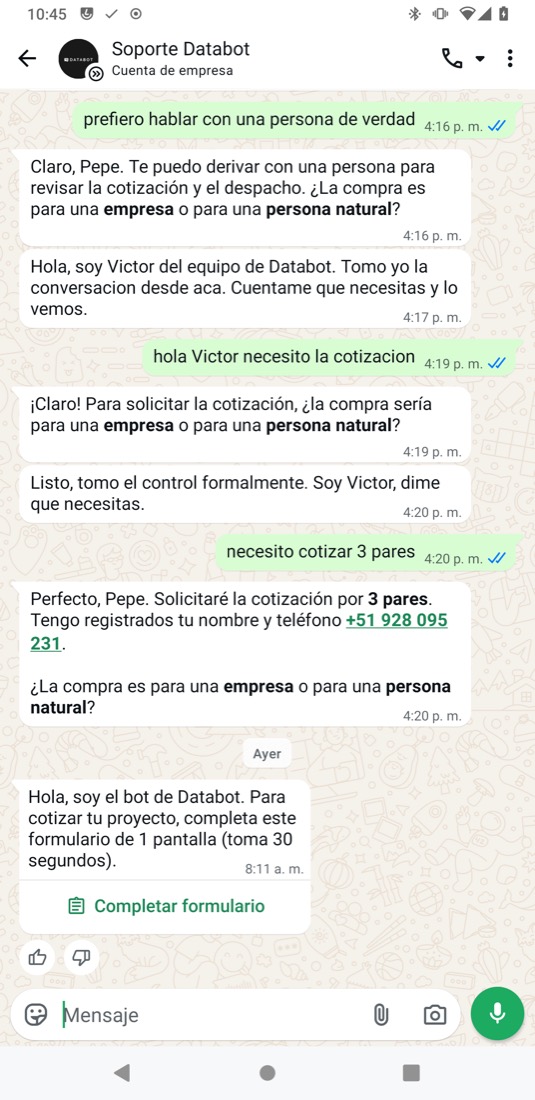
People write in several messages in a row: "hi", "I want a quote", "3 pairs", "I need help". Databot will group those messages and reply once.
A small pause before replying
When a message arrives, the bot waits a few seconds. If more arrive in that window, it groups them and replies to all of them with a single message, and your customer sees the "typing…" indicator, which is free. Besides saving money, the reply is better: the bot reads the whole idea instead of reacting to the first word.
What needs to be secured, now that every reply has a cost
- That the wait covers real bursts. Measure how many seconds pass between consecutive messages from the same person and adjust the pause to that data if needed.
- That the message arriving while the bot is already replying doesn’t slip through. This is the typical double-reply case: the person keeps writing while the reply is already being generated.
02Brief mode per bot and channel: fewer questions from the bot on WhatsApp Tested
On the web, the bot asking one question at a time costs nothing. On WhatsApp, each question is US$ 0.02. The proposal: a brief mode you turn on from your bot’s settings.
Three rules you turn on per bot
1. Ask only what’s missing. If the name and phone are already in the conversation, don’t ask for them again. 2. Ask several things at once with a form or with buttons, instead of one per turn. 3. No filler messages: no "one moment please" or "you’re welcome!"; the "typing…" indicator replaces the first, and the final "thanks" gets a reaction instead of a message.
03One-message forms instead of chains of questions Tested
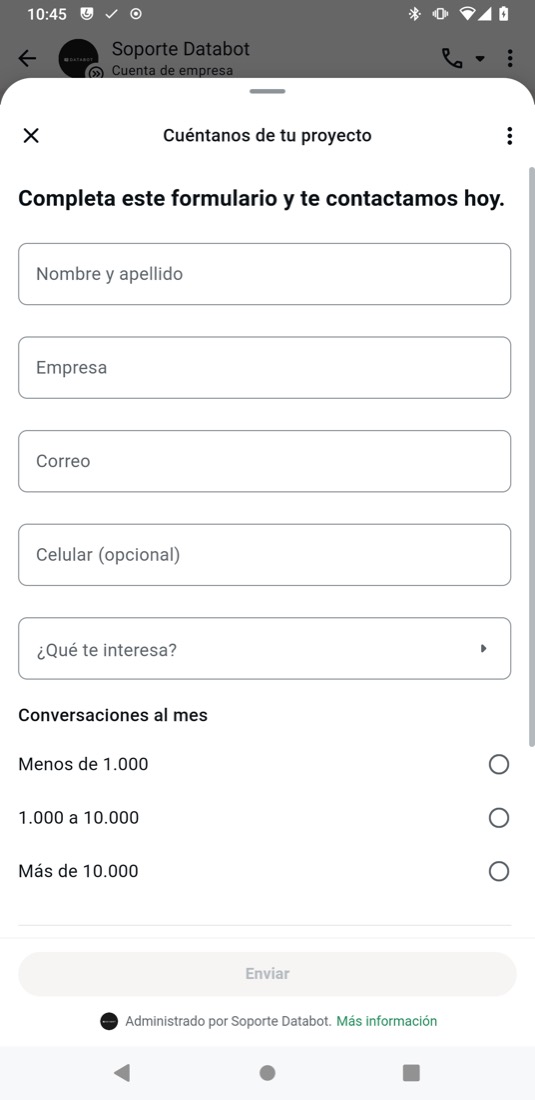
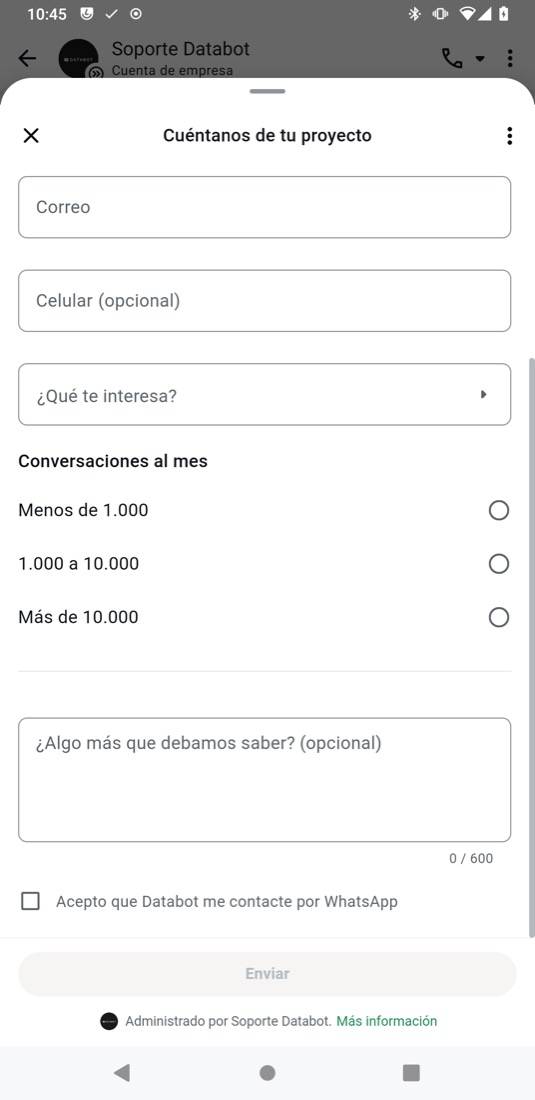
A native WhatsApp form opens inside the chat. All its screens and fields cost a single message, and what the person answers arrives for free. Captured on a real Android phone.
04"Continue on the web" button that keeps the conversation Tested
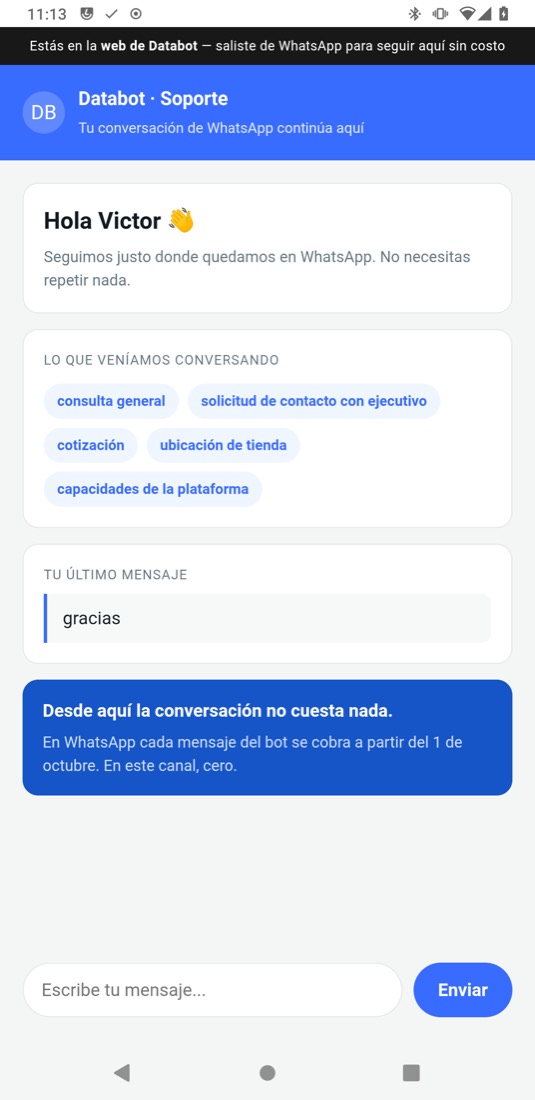
For long conversations — support, catalog, paperwork — the bot sends a button that opens Databot’s website with the same conversation. From there, every message costs zero.
A link that knows who your customer is
The button opens an address with a short-lived, signed code. The website uses that code to recover the real conversation — name, topics discussed, last message — and continues from there. The phone number never travels in the link, and an invalid code doesn’t open anything.
It’s only worth it when the conversation is going to be long: the button is also a charged message. It’s used for the heavy stretches; closing a hot sale stays on WhatsApp.
05WhatsApp calls when they’re cheaper than chat Tested
WhatsApp allows voice calls between your business and your customers within the same app. The ones the person starts are free; the ones the business starts are charged per minute. Databot already has the module that answers them with AI.
The elements, on the phone
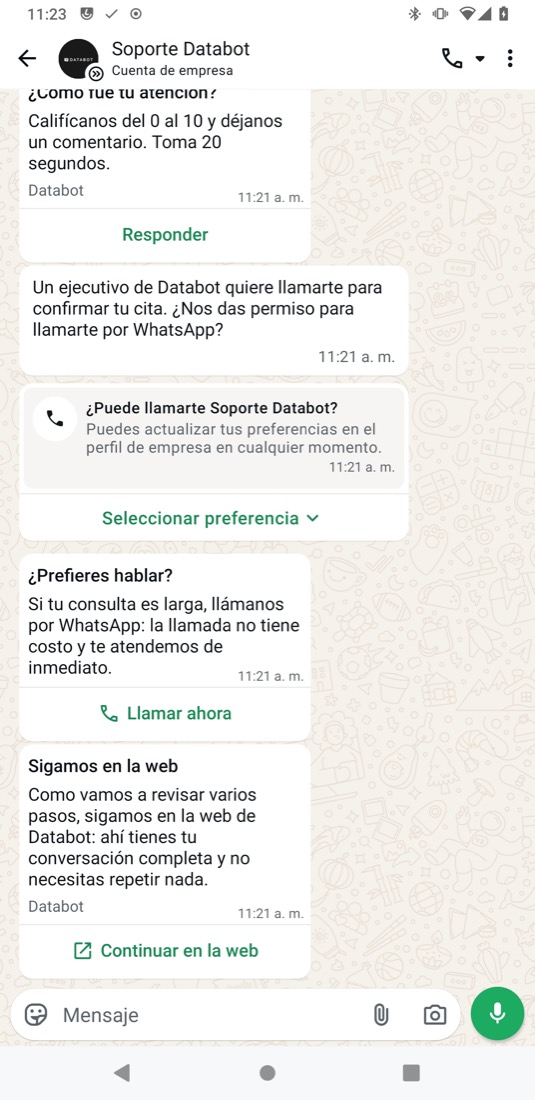
- 1Call icon in the chat header: the person calls without the bot sending anything. Incoming call, US$ 0.
- 2Permission request for the business to call: one message (US$ 0.02) and the WhatsApp card with "Select preference".
- 3"Call now" button inside a message (US$ 0.02): one tap and the call comes in.
- 4"Continue on the web": the handoff to the web from point 04, in the same chat.
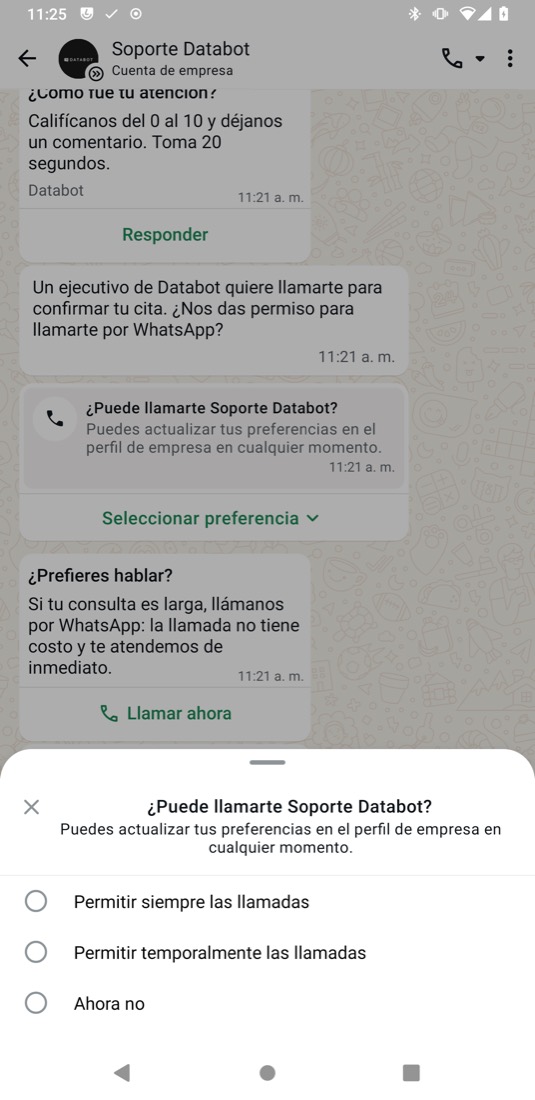
Call your customer starts (incoming)
06Lists and buttons to avoid the follow-up question Tested
When the bot offers options, a list (up to ten rows) or buttons (up to three) fit in the same reply message. The savings isn’t in that message — the bot already replies only once per turn — but in the extra round trip that’s avoided when the person writes something ambiguous.
Fewer round trips, zero misunderstandings
The bot replies only once per turn; what costs money are the follow-up questions when the free-text answer isn’t understood. With a list, the person picks and their answer arrives exact: every follow-up avoided is one fewer message.
07Reacting to "thanks", "ok" or "bye" instead of replying with another message Tested
When the person closes with "thanks", "ok" or "bye" after a rating or a confirmation, the bot today replies with one or two more messages. A reaction on that message closes the conversation just as well and isn’t a message: Meta doesn’t price it.
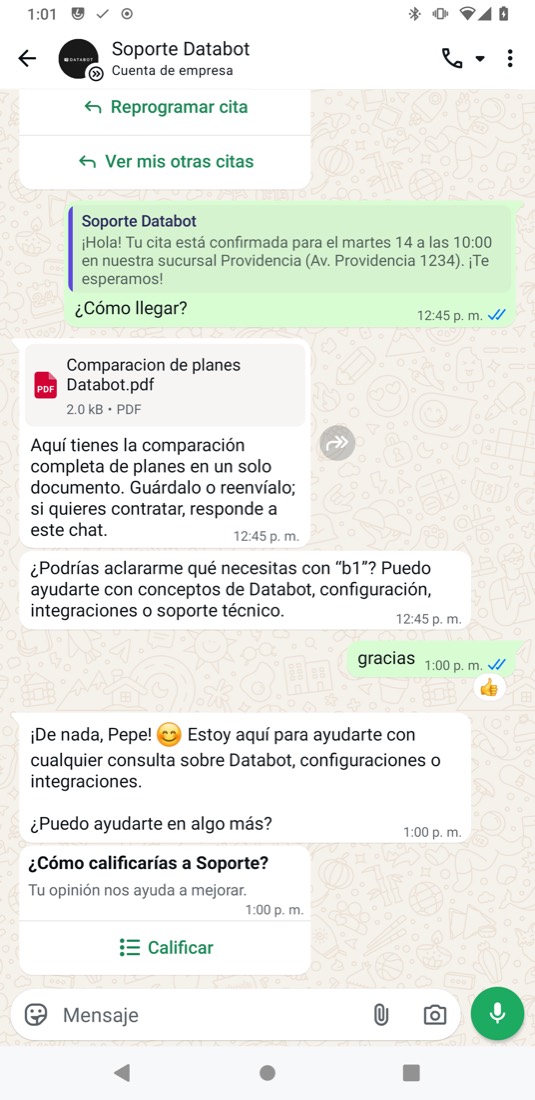
Where it applies and how
Only at closings: after the rating, a confirmation or an already-resolved reply, when the person is just thanking or saying goodbye. Clear rules: it never replaces a reply that carries information; if the "thanks" comes with a question, it’s answered normally; and the rating survey isn’t sent twice.
08Replying with a PDF or a voice note in a single message Tested
A plan comparison, a how-to or a long explanation don’t fit in one text message and end up taking three or four. As a document or as audio, they cost the same as a text: one message.
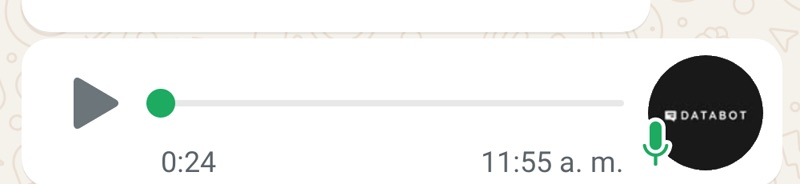
When to use it and when not to
PDF for what your customer saves or forwards: plans, quotes, guides, receipts. Voice note for explanations that are tiring to read or for people who already write with audio. Never for data the person has to copy — a number, a link, a code — that goes as text. Generating the audio or the PDF has its own cost, measured before turning it on per bot.
09Settings module: turn each feature on or off per bot Tested
None of these measures is forced on. Each feature is turned on or off from your bot’s settings, per channel, and you can also set a monthly WhatsApp budget with an alert and automatic savings mode once the cap is reached.
Your own switch, not a global change
Brief mode and each of its rules live in each bot’s settings. You turn them on for WhatsApp and leave them off on the web, where messages don’t cost anything.
Frequently asked questions
Does the 24-hour window disappear? +
No. It keeps existing and keeps resetting whenever your customer writes. What changes is that replying within it starts to have a cost once the free allowance is used up.
What counts as a service message? +
Any reply you send within the 24-hour window: text, image, file, a bot reply or a human agent reply. It doesn’t matter who wrote it.
Am I charged for the messages my customers send me? +
No. The charge applies to the messages the business sends.
Is the 1,000 free-message allowance per account or per number? +
Per business number. Three numbers mean 3,000 free messages a month. They don’t roll over from one month to the next.
Does switching providers help avoid the charge? +
No. The rate is set by Meta and applies the same on any platform. What does change is how many messages you need to resolve a conversation.
Is this charge from Databot or from Meta? +
From Meta. Databot doesn’t set these rates.
What about conversations that come in through a Click-to-WhatsApp ad? +
Those that qualify as a free entry point keep a 72-hour window at no charge. That’s one more reason to answer them quickly and resolve them within that window.
Let’s review your operation before October
We look at your real volume, how many messages each conversation needs to be resolved, and where your concrete savings opportunities are. No cost for Databot clients.
Schedule a reviewReference estimate. The actual cost of the WhatsApp Business Platform may vary depending on the recipient’s market, the message category, volume, the monthly free allowance, applicable free windows, taxes, commercial conditions and future updates from Meta. Databot does not control the rates set by Meta.
Service message rates according to the official WhatsApp Business Platform pricing documentation — sections Service rates effective October 1, 2026 and Rate cards effective October 1, 2026. Meta may update its rate card on the first day of each quarter.
